 MENU
MENU



Guidelines for Everyday Use of AI
Unlock the power of institutionally approved AI with this central resource for Mount Royal University students and employees. This page is your essential guide to integrating Google Gemini and its integrated Workspace apps into your academic and professional workflow, ensuring you are equipped to use AI responsibly and effectively.
To help you get started, we provide guidance and resources on this page and in linked documents on using Gemini, how to leverage NotebookLM for research and expert strategies for writing better prompts. We also provide materials to help you apply Mount Royal’s Framework for Responsible AI as you explore and build your skills in using AI.
Everyday AI use
For everyday work, an AI assistant can help you draft communications, summarize lengthy documents, analyze data, and brainstorm engaging approaches to your activities. To support these tasks, MRU provides Google Gemini and its integrated Workspace apps as our primary, institutionally supported AI tools.
When accessing Gemini, ensure you are logged into your MRU Google account. Using your @mtroyal.ca account ensures your data and inquiries remain protected within the MRU domain. There are enhanced data and privacy protections in Gemini for Education beyond those in public versions of Gemini.
General guidance
Because generative AI is a relatively new technology and is being rapidly developed, not every question about what Gemini can do or how it should be used has a detailed answer. While Mount Royal’s Framework for Responsible AI provides principles and guidelines for AI use, there are some specific “do’s” and “don’ts” to keep in mind. This guidance may evolve over time, and will be updated accordingly:
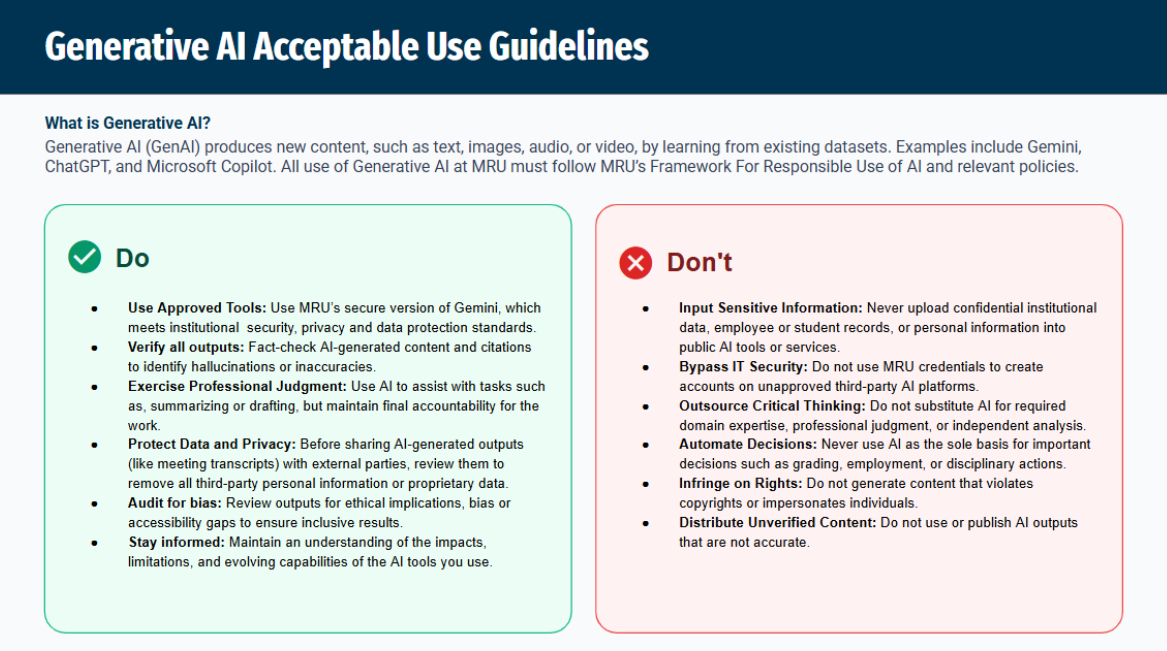
All @mtroyal.ca account use is subject to MRU policies, available on the MRU Technology Use Policies page.
If you create an account on an unapproved third-party AI platform, you should use a personal email address, not your @mtroyal.ca account. If you already have signed up for such services, please look into changing the registered email address to a personal one to avoid licensing issues with the provider.
Here are some ways to stay current on what’s new in Gemini:
- New features and tools are being released all the time. Google’s Gemini Apps Help site has the most up-to-date information.
- Official Gemini News and Updates Blog: You can subscribe to email updates by clicking the “Subscribe” button in the top right of the page. More details about changes are available in the Gemini Apps Release Notes.
- Google Workspace Release Calendar: Mount Royal follows the Rapid Release track for Google Workspace updates, shown in red on the release calendar. This calendar includes changes to Workspace that are not Gemini related. If you subscribe to the calendar by clicking “Add to Google Calendar”, events will appear in your MRU Google Calendar.
Frequently asked questions
What is Gemini?
Gemini is an artificial intelligence model developed by Google. Everyone with an @mtroyal.ca account has access to Gemini through MRU’s Google Workspace for Education license.
Why should I use MRU’s Gemini?
MRU’s Gemini for Education has much stronger data protections and privacy assurances than publicly available versions. Google will not use data from MRU users for training new AI models, and Google employees will not look at MRU data.
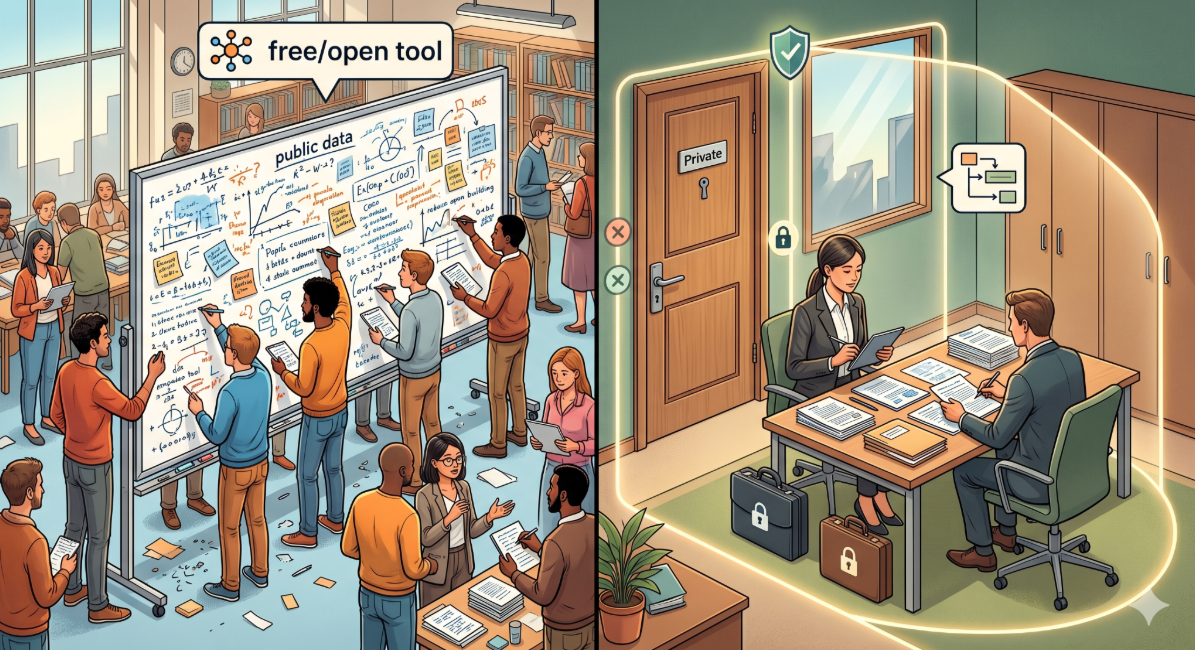
Here’s a simple analogy:
Using sensitive data with a free, public version of Gemini is like writing notes on a giant communal whiteboard in the public library.
In comparison, Gemini in an @mtroyal.ca account is like an assistant who meets you inside your locked office, reviews the files on your desk, helps you summarize them and then leaves. They are legally forbidden from taking your notes out of the room and they can't tell anyone else what they saw or learned.
Adding data to a prompt in Gemini is similar to creating a Google Doc within your MRU Google Workspace. While it is still important to be diligent — because you could share the document inadvertently — the risk is no greater within Gemini than storing the data in Drive or GMail.
Is my data safe when using Gemini?
Yes, Gemini use by Google Workspace for Education accounts is protected by enhanced enterprise data protections, and is covered by the same privacy policies, data security rules and support agreements that other Google services like GMail and Drive fall under. Google does not make any intellectual property claims on data inside Workspace services, including Gemini.
Is there data I should NOT include when talking to Gemini?
MRU Google Workspace, including Gemini, is approved for storing and processing the University's business, academic, research, and administrative information and records. As with all cloud services, extremely sensitive information such as social insurance numbers and passport information should not be uploaded.
Google’s Generative AI Prohibited Use Policy lists specific activities and types of data that are not permitted, and all activity must comply with MRU policies on data use.
Are my Gemini conversations reviewed by Google or used to train Google AI models?
No. The Gemini app is a core Google Workspace service and is therefore included and protected by Mount Royal University’s agreement with Google. Interactions with the Gemini app stay within Mount Royal University and are not reviewed by Google employees or otherwise used to improve Google's generative AI models.
Where can I find the terms of service for Google Workspace and Gemini?
Here are relevant terms and policies for Google Workspace for Education.
Can I use another AI service such as Microsoft Copilot or OpenAI ChatGPT.
Google Gemini is the only institutionally approved Generative AI tool at this time. Under Mount Royal’s Framework for Responsible AI, ITS is responsible for assessing new AI tools for institutional use. Employees can submit a request through this form to have specific AI tools assessed.
What if I encounter technical issues or have questions?
Google’s Gemini support site has full documentation of Gemini’s capabilities and how to use it. Contact the ITS Service Desk for technical support.
What training resources are available?
Below are a variety of courses and resources you can access. Additional training and learning opportunities will be added over time as tools, practices and our understanding of AI continue to evolve.
Courses:
Visit Google Skills to access a variety of courses including a learning path focused on Google Workspace with Gemini.
Third-party resources: